
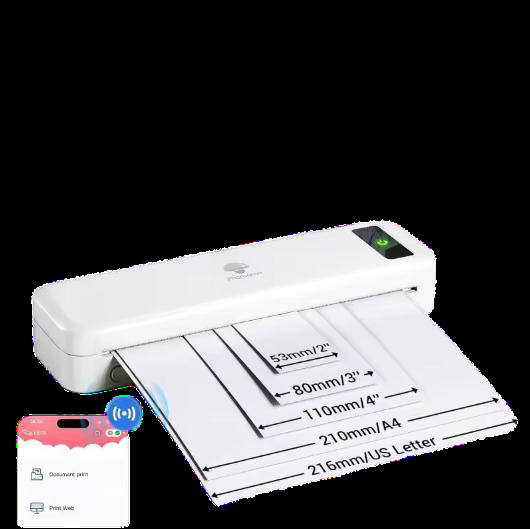
Understand how thermal printers work, what they are used for, and whether an A4 thermal printer is worth it for document printing. A practical guide for B2B buyers evaluating thermal printing technology for office, logistics, and field operations.
Thermal printers are everywhere in modern business — on courier desks, in warehouse aisles, at point-of-sale terminals, and increasingly in mobile field operations. They print without ink or toner, which makes them fast, quiet, and low-maintenance. But the technology is not one single thing: direct thermal and thermal transfer work differently, and choosing between them affects your paper costs, print longevity, and the range of documents you can produce.
This guide explains what a thermal printer is, how the two main technologies work, what they are used for, and whether an A4 thermal printer is a practical choice for document printing. It is written for procurement and operations teams who need to evaluate the technology against real workflows — not just compare spec sheets.
What is a thermal printer?
A thermal printer is a printing device that creates images by applying heat to specially coated paper (direct thermal) or by melting a ribbon onto the media (thermal transfer). It has no ink cartridge, no toner, and no print head that sprays or strikes the page. The print head contains tiny heating elements that activate selectively to form text, barcodes, or graphics.
Because there is no liquid ink or powder toner, thermal printers have fewer moving parts than laser or inkjet machines. They are generally smaller, lighter, and quieter. The trade-off is that the output depends entirely on the paper (and ribbon, in thermal transfer) you feed them — which is why media selection matters more than with conventional printers.
How does a thermal printer work?
Thermal printing works on a simple principle: heat changes the appearance of the media. The print head is a fixed array of small heating resistors. When a print command is sent, the printer selectively heats these resistors as the paper passes over them. Each heated point becomes a dot; the pattern of dots forms the image.
Two factors control print quality:
- Resolution (dpi): The density of heating elements on the print head. Common values are 203 dpi (standard for labels and receipts), 300 dpi (sharper text and smaller barcodes), and 600 dpi (fine graphics or very small codes).
- Print speed: Measured in millimeters or inches per second. Faster speeds are useful for high-volume label printing but can reduce image density if the paper does not dwell long enough on the heat source.
The actual mechanism differs slightly depending on the technology, which we cover next.
Direct thermal vs. thermal transfer
These two technologies are often grouped under the same “thermal printer” label, but they are not interchangeable. The difference is fundamental and affects your consumables and the durability of the print.
| Attribute | Direct thermal | Thermal transfer |
|---|---|---|
| How it prints | Heat activates chemicals in the paper itself | Heat melts a wax/resin ribbon onto the paper |
| Consumables | Thermal paper only | Ribbon + paper (plain or coated) |
| Print longevity | Short to medium; fades with heat/light exposure | Long; resistant to heat, light, and abrasion |
| Typical use | Receipts, shipping labels, temporary documents | Asset labels, durable barcodes, archival documents |
| Operating cost | Lower (no ribbon) | Higher (adds ribbon cost) |
For most document applications, direct thermal is the simpler and cheaper option. If you need prints that must survive years of handling, sunlight, or chemical exposure, thermal transfer is the correct choice.
What is a thermal printer used for?
Thermal printers are used wherever speed, reliability, and low maintenance matter more than photographic color quality. Common applications include:
- Receipts and POS: Retail, restaurants, and ticketing systems print receipts on compact direct thermal units.
- Shipping and logistics: Couriers and warehouses print address labels, barcodes, and pick lists in high volumes.
- Healthcare and labs: Wristbands, specimen labels, and prescription labels need smudge-proof output that survives handling.
- Manufacturing and asset tracking: Durable barcode labels for equipment, circuit boards, and inventory bins are often printed via thermal transfer.
- Field and mobile operations: Portable thermal printers produce invoices, work orders, and delivery notes on-site, away from a desk.
For a B2B buyer, the common thread is operational printing — documents and labels that are produced as part of a workflow, not for presentation or marketing.
A4 thermal printers for documents
Most thermal printers output narrow media — 2 to 4 inches wide — which suits labels and receipts. But A4 thermal printers print full-size documents (210 x 297 mm). They are used when you need a physical copy of a standard document without the bulk and noise of a laser printer.
Two types exist:
- Direct thermal A4 printers: Print on A4 thermal paper. The output is monochrome (usually black or blue-black) and will fade over time. These are common for fax-like documents, internal forms, and temporary copies.
- Thermal transfer A4 printers: Use a ribbon and can print on plain A4 paper. Output is more durable and can be archived, but the printer and ribbon cost more.
An A4 thermal printer is worth considering if your team prints documents in the field, on vehicles, or in environments where toner dust or ink spills are a problem. They are also quieter than laser printers, which matters in shared or patient-facing spaces.
However, for high-volume office document printing with mixed content (color charts, photographs, multi-page reports), a laser or inkjet remains more practical. Thermal A4 printing is monochrome, and direct thermal paper is not archival.
Portable thermal printers for field work
Portable thermal printers are battery-powered, compact units that fit in a vehicle or a field bag. They connect to a smartphone, tablet, or rugged laptop via Bluetooth, Wi-Fi, or USB. They print on rolls of thermal paper, typically 2 to 4 inches wide, and are used for:
- Delivery confirmation receipts
- Mobile invoicing and payment receipts
- Field service work orders
- Parking tickets and inspection notes
- Warehouse shelf labels
The main advantages are portability, instant output, and the absence of ink cartridges to carry. The main limitation is media width — you cannot print an A4 document on a standard portable thermal printer.
Understanding thermal printer paper
Thermal paper is not ordinary paper. It has a coating that contains a colorless dye and a developer. When heated, the dye and developer react and form a visible image. The quality of this coating determines print darkness, resistance to fading, and whether the paper jams or curls.
Key considerations when buying thermal paper:
- Coating quality: Higher-quality coatings produce darker, more consistent prints and are less likely to leave residue on the print head.
- Basis weight: Heavier paper (e.g., 70–80 g/m²) is more durable and less prone to curling, but it costs more.
- Top coating: Some papers include a protective top coat that improves resistance to water, oils, and abrasion.
- Storage life: Direct thermal paper darkens over time when exposed to heat, light, or certain chemicals. If you need long-term storage, use thermal transfer printing or specify archival-grade thermal paper.
Buyer note: The print head is the most expensive part of a thermal printer. Using low-quality or abrasive paper wears it out faster and can void the warranty. When sourcing paper, confirm the coating type and basis weight with the printer manufacturer.
Is a thermal printer worth it?
Whether a thermal printer is worth it depends on your application. It is not a general-purpose replacement for a laser or inkjet printer. It is a specialized tool that excels in specific conditions.
| Scenario | Thermal printer advantage | Consideration |
|---|---|---|
| High-volume label printing | Fast, no ink/toner to replace, low per-label cost | Requires correct label stock and ribbon (if transfer) |
| Mobile / field receipts | Battery-powered, compact, instant output | Limited to narrow paper widths |
| Quiet office environments | Much quieter than dot matrix or laser | Monochrome only; paper fades over time |
| Harsh environments (dust, moisture) | Fewer moving parts, less to break | Media must be matched to conditions |
| General office documents | — | Laser/inkjet is more versatile and cheaper per page |
When it is worth it: You print labels, receipts, or field documents in volume, and you value uptime and low maintenance over color or archival quality.
When it is not worth it: You need color, long-term document storage, or mixed-content office printing.
FAQ
Do thermal printers need ink?
Direct thermal printers do not need ink or toner — the image is created by heat on coated paper. Thermal transfer printers use a ribbon that works like a solid ink source, but it is a roll of wax or resin, not a liquid cartridge.
How long does thermal printing last?
Direct thermal prints typically last from several months to a few years, depending on paper quality and exposure to heat, light, and chemicals. Thermal transfer prints can last many years or decades, especially with resin ribbon on synthetic labels.
Can a thermal printer print on regular paper?
Direct thermal printers require special coated thermal paper. Thermal transfer printers can print on plain paper, but only if a ribbon is installed. You cannot use ordinary paper in a direct thermal printer.
Is A4 thermal printing suitable for legal documents?
Only if you use thermal transfer technology or an archival-grade direct thermal paper. Standard direct thermal output is not considered archival because it fades over time. Confirm the paper's stated longevity with the manufacturer before relying on it for legal records.
What is the difference between 203 dpi and 300 dpi?
203 dpi is adequate for most labels and receipts with standard-size text and barcodes. 300 dpi produces sharper text and can print smaller, denser barcodes that are easier to scan. Choose 300 dpi or higher if you print small fonts, complex graphics, or barcodes that must scan reliably at close range.