
A buyer guide for first-time laser engraver buyers, ranking the five features that actually reduce mistakes—enclosure, positioning aids, control options, honest work area, and material limits—over spec-sheet marketing. Includes real specifications from WAINLUX models so you can compare before you buy.
Buyer Guide
Most first-time buyers find a laser engraver by sorting a spec sheet by wattage. That number tells you how much power the diode puts out, but it says very little about whether you will finish your first ten projects without ruining material, burning a finger, or discovering that your planned design does not fit the work area. The features that keep a beginner moving are mechanical and operational: an enclosure, positioning aids, a control method you can actually use, and a work area measured in real dimensions.
Below are the five features worth ranking above headline wattage, with notes from three current WAINLUX models that show how these choices look in practice.
- Enclosures and positioning aids reduce beginner error rates more than a small wattage increase.
- Work area is measured in centimeters; confirm the size of the parts you plan to engrave before buying.
- Offline button control and app control solve different problems; a machine with both gives you options.
- Material compatibility stops at bare metal and thick cutting on diode machines; plan around that limit.
Five features that matter, in order
-
Enclosure and eye protection
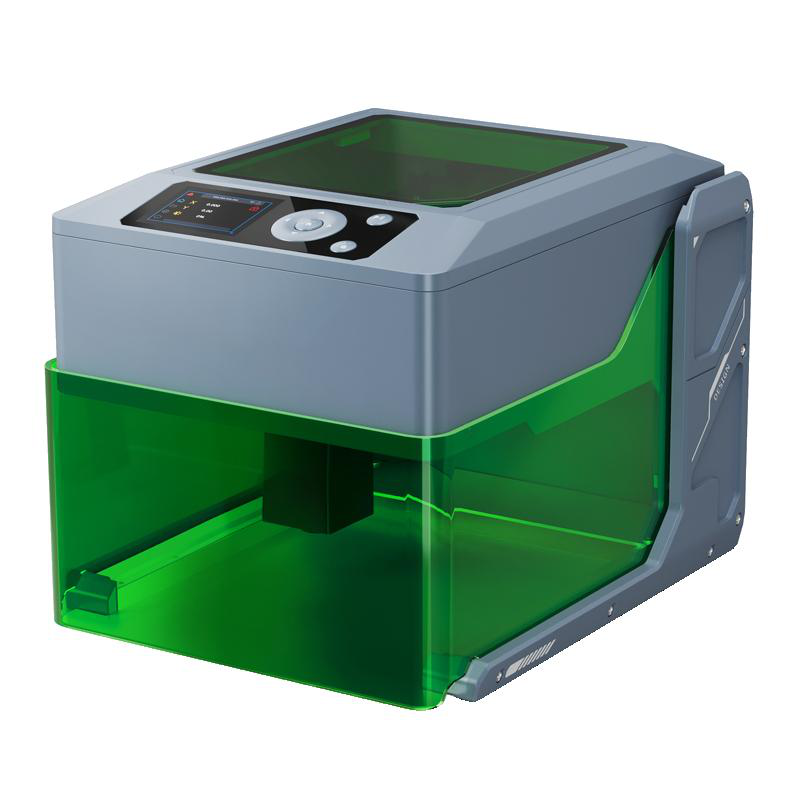
A laser diode is a bright, concentrated light source, and the smoke and fumes from engraving acrylic, leather, or painted metal need somewhere to go. A machine with a fully enclosed housing and a tinted shield lets you watch the job without staring directly into the beam. The WAINLUX K10-5W uses a fully enclosed housing with a tinted shield. The WAINLUX XN001-3W takes a different approach: an ABS shell with overheat protection rather than a full enclosure. Both designs address safety, but they suit different rooms and budgets. If your only workspace is a shared room, enclosure design should be near the top of your list.
-
Positioning aids
Beginners lose more material to misaligned artwork than to weak power. A metal positioning plate or a smart positioning system helps you place the workpiece and repeat a known position. The WAINLUX XN001-3W ships with a metal positioning plate. The WAINLUX F1 series includes smart positioning and a built-in screen. These aids matter because they turn a vague “place it roughly here” into a repeatable setup, which is the difference between one decent test piece and a consistent batch.
-
Control options
How you send a job to the machine affects how often you use it. The XN001-3W supports USB, Bluetooth app control, and an offline button. The K10-5W offers WiFi, PC control, and offline operation. The F1 series adds a built-in screen. App control is convenient for quick edits from a phone; PC control is better for detailed vector work; offline buttons and screens are useful when you do not want to keep a computer next to the machine. A first machine with at least two control paths is easier to live with than one that depends on a single connection.
-
Honest work area
Work area is printed in centimeters, and it is easy to misread as inches. The XN001-3W has a 9.8 × 8.8 cm work area; the K10-5W and F1 series both list 10 × 10 cm. Measure the largest item you expect to engrave—a phone case, a coaster, a small sign—and compare that number to the listed area before you buy. A machine with a generous wattage rating but a work area smaller than your typical project will send you back to the store.
-
Material compatibility and cutting limits
Diode lasers handle wood, bamboo, acrylic, leather, plastic, ceramic, painted metal, and glass. They do not engrave bare metal, and they are not designed for thick cutting. The XN001-3W engraves those listed materials. The K10-5W cuts 3–5 mm plywood in addition to engraving. If your first projects are coasters, keychains, and engraved panels, any of these machines can do the job. If you plan to cut 10 mm hardwood, no beginner diode machine in this class will do it, and no spec sheet will change that.
Model comparison at a glance
| Feature | WAINLUX XN001-3W | WAINLUX K10-5W | WAINLUX F1 series |
|---|---|---|---|
| Power | 3W | 5W | Not specified in the brief |
| Work area | 9.8 × 8.8 cm | 10 × 10 cm | 10 × 10 cm |
| Enclosure | ABS shell with overheat protection | Fully enclosed housing with tinted shield | Not specified in the brief |
| Positioning | Metal positioning plate | Not specified in the brief | Smart positioning |
| Control | USB, Bluetooth app, offline button | WiFi, PC, offline | Built-in screen |
| Portability | Foldable, power-bank compatible | Not specified in the brief | Not specified in the brief |
| Cutting | Engraving only for listed materials | Cuts 3–5 mm plywood | Not specified in the brief |
How to choose without overbuying
Start with the material and the size of the largest piece you expect to engrave. If you plan to engrave small wooden tags and leather patches, a 3W machine with a 9.8 × 8.8 cm bed and a positioning plate covers the job. If you want to cut 3–5 mm plywood, step up to the K10-5W, which also adds a fully enclosed housing and a tinted shield. If you prefer to work from a built-in screen without a phone or laptop attached, the F1 series is the relevant option.
Power-bank compatibility on the XN001-3W is worth noting if you work at craft fairs or in spaces without a nearby outlet. The foldable design is a portability feature, not a performance claim; it does not change the work area or the material list.
What the spec sheet usually leaves out
Wattage is easy to compare and easy to market. The features above—enclosure, positioning, control paths, honest work area, and material limits—are what you interact with on every job. When you compare machines, put those five rows at the top of your own table, and treat wattage as one row among them rather than the headline.
Xiamen Spring Technology Co., Ltd. has manufactured laser engraving equipment since 1998, operates under ISO9001 at the company level, and exports to more than 50 countries. The company offers OEM/ODM services. For current specifications and availability on the models discussed above, see the product pages for the WAINLUX XN001-3W and the WAINLUX K10-5W.
FAQ
Can a beginner laser engraver cut wood?
The K10-5W cuts 3–5 mm plywood. The XN001-3W is listed for engraving on wood and other materials, not for thick cutting. If cutting is a core requirement, check the cutting specification before buying.
Is an enclosure necessary?
An enclosure improves safety and containment, particularly in shared spaces. The K10-5W has a fully enclosed housing with a tinted shield; the XN001-3W uses an ABS shell with overheat protection. The right choice depends on where you will use the machine.
Can I use a laser engraver without a computer?
The XN001-3W supports an offline button, and the K10-5W supports offline operation. The F1 series adds a built-in screen. App and PC control remain available on the models that list them.
Will a 3W laser engrave metal?
The XN001-3W engraves painted metal and glass among other materials, but it is not intended for bare metal. If your material is bare metal, confirm compatibility with the supplier before ordering.