

A buyer-focused guide to choosing the best desktop laser cutter for cutting. We break down real capacity, enclosure and extraction requirements, connectivity, and a practical batch workflow test to help you match a desktop laser cutting machine to your production needs.
Why Desktop Format Changes the Cutting Question
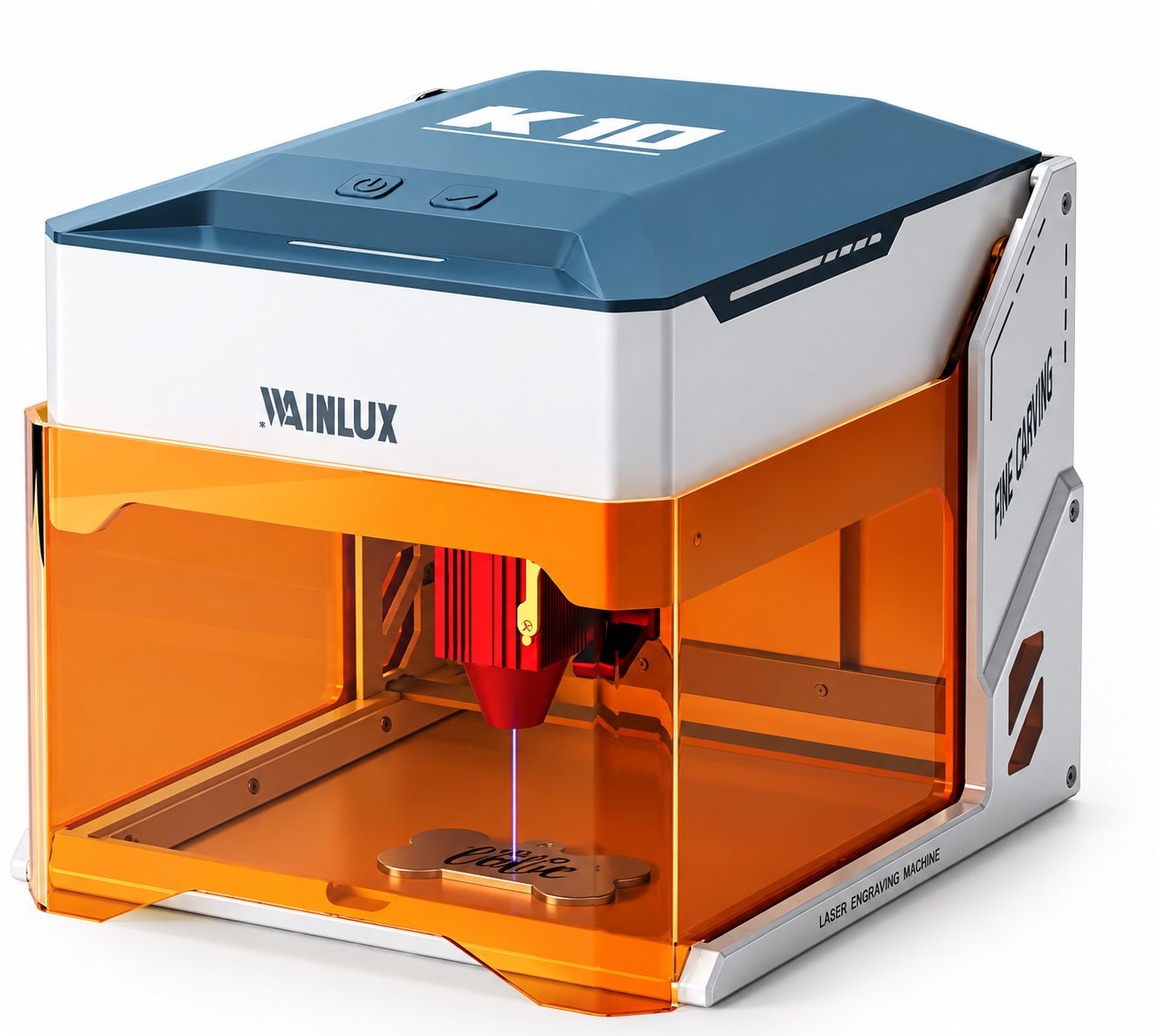
When buyers search for the best desktop laser cutter, they usually already know they want a small machine. The real question is not whether a desktop unit can cut, but how much cutting it can sustain, what fits on its bed, and how a small bed affects a production run. A desktop laser cutting machine trades bed size for floor space, and that trade only makes sense if your workflow adapts to it.
This guide focuses on cutting duty: what a desktop unit can run per session, which materials and thicknesses fit, and how batch workflow offsets a smaller working area. We compare enclosure, extraction, and connectivity across three real machines from a manufacturer with over 25 years of experience, so you can match machine specs to actual jobs.
Key takeaways for buyers
- Desktop laser cutters are session-based tools; duty cycle and thermal limits matter more than peak power.
- Bed size limits part dimensions, not necessarily daily output, if you nest and fixture parts.
- Enclosure and extraction are not accessories; they determine where and how long you can run the machine.
- Connectivity (WiFi, USB, offline) affects how easily one machine fits into a multi-step shop.
- Match the laser wavelength and power to your dominant material before comparing brand names.
Defining Duty Cycle for a Desktop Laser Cutter
Duty cycle is the honest limit on any desktop laser cutter. Unlike industrial cabinets with chiller loops and oversized power supplies, desktop units package the laser, motion system, and electronics into a confined space. Heat builds up in the laser module, the gantry motors, and the enclosure.
For cutting tasks, duty cycle shows up as a practical pattern: how many minutes of continuous cutting before you should pause, and how long a pause is needed. A machine marketed for engraving may handle long, low-power passes, but cutting thin plywood at higher power draws more current and generates more heat. Buyers should ask the supplier for a recommended continuous cutting duration and a cooling pause interval for the specific material and thickness they plan to run.
This is not a flaw of desktop machines. It is the design trade that keeps them on a desk. The question is whether your batch size fits within that pattern. If your typical job is 20 minutes of cutting followed by assembly or finishing, a desktop unit works well. If your job is six hours of uninterrupted cutting, a desktop format will force you to split the run or accept longer total time.
Real Capacity: Materials, Thickness, and Bed Size
Desktop cutting capacity has three dimensions: material type, maximum thickness, and bed area. The first two determine what you can cut. The third determines how many parts you can cut per load.
A 455nm blue diode laser is the common wavelength for desktop cutting and engraving on organic materials. It works on plywood, basswood, MDF, leather, felt, cardboard, and some dark acrylics. The WAINLUX K10-5W uses a 455nm 5W laser in a fully enclosed body with a tinted shield, and it cuts 3-5 mm plywood. That thickness range covers small enclosures, model parts, jigs, and craft production pieces. It connects via WiFi, PC, or offline mode.
The WAINLUX F1 pairs a 455nm 10W head with a 1064nm head in a 10 x 10 cm working area, with WiFi and a built-in screen. The dual-laser design matters for buyers who work organic sheet and also need to mark bare metal, which requires the 1064nm wavelength. The trade is a smaller bed: 10 x 10 cm suits small parts, tags, and components, not full panels.
The WAINLUX X1-20W dual-laser covers a 30 x 30 cm area with both 455nm and 1064nm heads, and connects via WiFi, USB-C, or TF offline. The larger bed and 20W output give it more cutting headroom per pass, which can reduce the number of passes needed on thicker plywood within its rated range. For buyers comparing the best desktop laser cutter for cutting, the X1-20W sits at the higher-capacity end of the desktop class.
Desk Footprint and Enclosure: Where the Machine Can Live
A fully enclosed machine with a tinted shield is a different product from an open-frame desktop laser. Enclosure affects three buyer concerns: operator safety, fume containment, and placement. An enclosed unit can sit in a small workshop, a design studio, or a classroom without exposing nearby people to the beam path. The tinted shield lets the operator watch the cut without opening the lid.
Open-frame machines often cost less, but they require the buyer to build or buy an enclosure and a separate extraction setup. That added work is part of the total cost and should be compared honestly. For a buyer choosing mainly for cutting, a fully enclosed machine like the K10-5W removes that integration step.
Desk footprint also matters. A desktop unit needs clearance for the lid, the material feed, and the extraction hose. Measure not just the machine base but the open-lid height and the space behind the unit for airflow. If the machine sits against a wall, confirm the extraction port orientation before purchase.
Extraction and Fume Management for Cutting
Cutting produces more smoke and particulate than light engraving because the laser removes more material. Plywood and MDF release visible smoke and fine dust. A desktop laser cutter used for cutting needs active extraction, not just a filter pad.
Buyers should confirm three points with the supplier: the extraction port diameter, the recommended airflow for the materials they cut, and whether the machine has an internal fan or requires an external extractor. For enclosed units, the extraction path should pull fumes away from the operator side and out of the enclosure. If the unit vents into the room, a separate filtration unit or duct to outside is necessary.
Buyer tip: Run a smoke test before committing to a full batch. Cut the thickest material in your plan, watch where smoke escapes, and check whether the enclosure stays clear. If fumes linger, upgrade extraction before scaling the job.
Connectivity and Workflow Fit
Connectivity is not a luxury on a desktop laser cutting machine. It determines how the machine fits into your process. WiFi lets you send jobs from a design station without moving a USB stick. USB and TF offline modes matter when the machine sits away from the network. A built-in screen helps when you need to adjust parameters at the machine without a computer.
The K10-5W offers WiFi, PC, and offline operation. The F1 adds a built-in screen alongside WiFi. The X1-20W supports WiFi, USB-C, and TF offline. For a small shop, the practical question is whether the operator can start a cut, adjust settings, and repeat a job without walking to another room. If the machine is in a shared space, WiFi and offline modes reduce friction.
Desktop Laser Cutter Comparison Table
| Model | Working Area | Laser | Enclosure | Connectivity | Cutting Scope |
|---|---|---|---|---|---|
| WAINLUX K10-5W | Small desktop bed | 455nm 5W | Fully enclosed, tinted shield | WiFi, PC, offline | Cuts 3-5 mm plywood and similar organic sheet |
| WAINLUX F1 | 10 x 10 cm | 455nm 10W plus 1064nm | Desktop format | WiFi, built-in screen | Small parts in organic sheet and bare-metal marking via 1064nm |
| WAINLUX X1-20W | 30 x 30 cm | 455nm and 1064nm, 20W | Desktop format | WiFi, USB-C, TF offline | Larger nested parts across both wavelengths |
Batch Workflow: Offsetting a Smaller Bed
A smaller bed does not automatically mean lower output. It means the workflow must be built around the bed. Nesting, fixtures, and sheet sizing let a desktop laser cutter run batches efficiently. The goal is to keep the laser cutting while the operator handles other steps.
Nesting software arranges parts on the sheet to minimize waste and maximize the number of pieces per load. For a 30 x 30 cm bed, thoughtful nesting can fit a set of small parts that would otherwise be spread across a larger sheet. For a 10 x 10 cm bed, nesting is less about packing density and more about standardizing part size so each load is predictable.
Fixtures hold parts in the same position every run. A simple wooden or acrylic jig with cutout slots lets the operator load and unload quickly and keeps the cut aligned. This matters for repeat jobs where registration errors cost material. Sheet sizing is the third lever: buy or pre-cut material to match the bed so you are not trimming large panels at the machine.
Batch Workflow Test: Seven Steps
Use this test to judge whether a desktop laser cutter fits your cutting load before you buy.
- List your five most common parts with their material, thickness, and dimensions.
- Check each part against the machine bed; note how many fit per load with your intended nesting.
- Estimate the cut time per load based on the material and thickness, using the supplier's recommended settings.
- Add a cooling pause based on the supplier's duty cycle guidance for continuous cutting.
- Calculate the total time for a realistic batch, including load, cut, pause, and unload.
- Compare that total time with your available operator hours and your deadline.
- Decide whether the desktop format meets the batch, or whether the job needs a larger machine or a split run.
This test turns a vague concern about duty cycle into a clear yes or no for your specific job.
Common Buyer Questions
Can a desktop laser cutter cut 5 mm plywood?
The K10-5W is rated to cut 3-5 mm plywood. For thicker material, buyers should check the specific machine's rated cutting range and expect multiple passes. Always confirm the thickness and material with the supplier before committing to a production run.
What does the 1064nm head add for cutting?
The 1064nm head adds bare-metal marking, which a 455nm diode cannot do on uncoated metal; coated metal surfaces can be marked by the 455nm head. The F1 and X1-20W both pair a 455nm head with a 1064nm head, so one machine covers both kinds of work.
Is enclosure required for desktop laser cutting?
An enclosure is not required by every machine design, but it controls fumes and protects nearby people. The K10-5W is fully enclosed with a tinted shield. Open-frame machines need a separate enclosure and extraction plan, which adds cost and setup work.
How does WiFi help a cutting workflow?
WiFi lets you send a job from a design computer without moving files on a USB stick. It also lets one operator manage the machine from a nearby station. Offline modes matter when the machine sits outside network range.
Matching the Machine to the Job
Choosing the best desktop laser cutter for cutting comes down to matching three variables: the largest part you need to cut, the thickest material you run, and the longest uninterrupted session your production requires. If your parts fit a 30 x 30 cm bed and your material is within the rated cutting range, the X1-20W offers the most bed area and dual-laser flexibility. If your parts are small and you need both wavelengths in a compact footprint, the F1 with its 10 x 10 cm area and built-in screen is a focused tool. If you cut 3-5 mm plywood and want a fully enclosed machine with simple connectivity, the K10-5W is designed for that job.
WAINLUX has been manufacturing since 1998, holds an ISO9001 company-level certificate, and exports to more than 50 countries. The company offers OEM and ODM services. Buyers can review the K10-5W desktop laser cutter and the F1 dual-laser desktop machine for detailed specifications.
Have a cutting job in mind? Send us your material, thickness, and part dimensions. We will help you match a desktop laser cutting machine to your batch workflow and confirm the duty cycle for your application.