
A practical guide for small-batch producers and studio buyers deciding whether a desktop laser engraving machine fits a cramped bench. Covers real machine footprints from one supplier's range, the difference enclosure makes at a desk, power and offline workflow, and how to trade work area against clearance.
Workshop Planning
Whether a desktop laser engraving machine fits your bench is decided by two numbers most listings bury: the machine's outer footprint and the clearance you need around it. This guide works through both, plus enclosure, power and workflow, using specifications from three models in one supplier's range.
What this article covers
- Why outer footprint, not work area, decides whether it fits
- Three desktop classes and the space each actually needs
- What an enclosure changes at a desk
- Power and file-transfer workflow in a small room
- Air, light and bench layout considerations
- Choosing between a small enclosed unit and a larger open-frame machine
Footprint is not the same as work area
Buyers searching for a desktop laser engraving machine usually start with the work area, because that is what the job needs. A 30 x 30 cm bed sounds generous until you measure the desk. The machine's outer dimensions are what have to physically fit, and the work area is what your material has to fit inside those outer dimensions. A unit can engrave a 30 cm square and still occupy noticeably more bench than 30 cm in one direction.
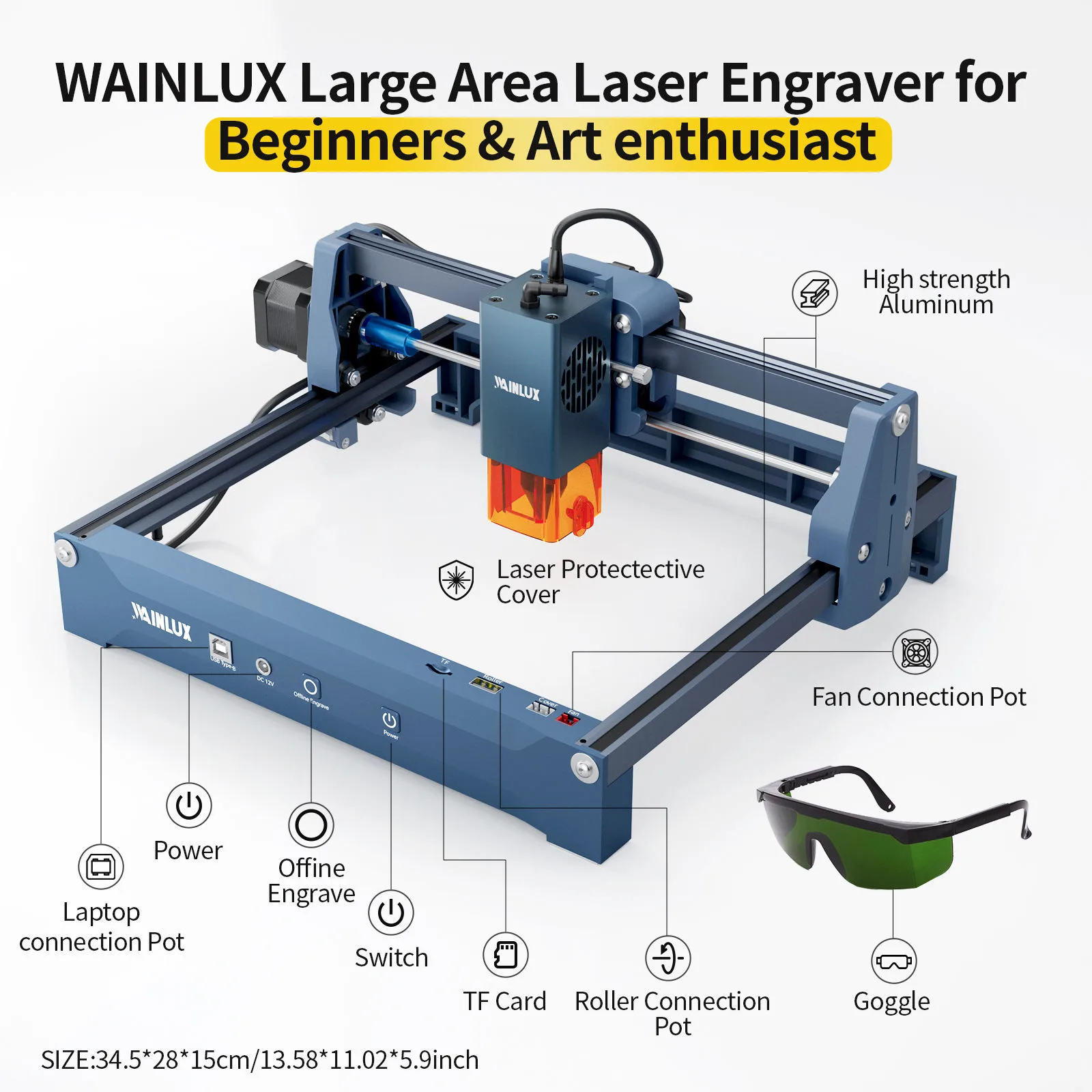
Take the WAINLUX X1 as a concrete example. Its machine size is approximately 34.5 x 28 x 15 cm, and it carries a 30 x 30 cm work area. The housing is only marginally wider and deeper than the engraving field, so the practical question becomes not "is there room for a 30 cm machine" but "is there room for the machine plus whatever sits behind, beside and under it."
That is why a tape measure on the bench, before ordering, is worth more than any comparison chart. Measure the depth of the bench against the wall, note where the power outlet sits, and mark the rectangle the machine will occupy. Then add the space you need to load material, reach the control point and route cables. If those additions do not fit, a smaller machine class is the answer, not a reshuffle of the same bench.
Three desktop classes and the space each needs
Desktop laser engraving machines in this range fall into two broad shapes: open-frame units with a larger working field, and enclosed units built around a protective cover and dust box. The enclosed group splits again by work area.
| Model | Machine size | Work area | Format |
|---|---|---|---|
| WAINLUX X1 20W | Approx. 34.5 x 28 x 15 cm | 30 x 30 cm | Open-frame desktop unit |
| WAINLUX K8 | Compact enclosed cube | 8 x 8 cm | Enclosed, with dust box |
| WAINLUX K10 5W | Enclosed desktop unit | Approx. 10 x 10 cm class | Enclosed, with dust box |
When the larger open-frame machine is the right fit
A 30 x 30 cm field handles flat stock such as small signs, panels, leather pieces, coasters and similar items where several parts can be nested in one pass. The trade-off is that the unit is a bench instrument: material goes on the bed in the open, and you need working room around the frame to place and remove it without knocking into anything. In a workshop where the laser has its own table, that is straightforward. On a shared bench that also holds a drill press or a cutting mat, the 34.5 cm width is a real constraint worth planning around.
When an enclosed cube is the right fit
The K8 is built as a compact enclosed cube with an 8 x 8 cm work area and a dust box. The K10 is the next size up in the same enclosed format, with a work area in the roughly 10 x 10 cm class. Both are aimed at small, repeated items: key tags, small plates, jewellery blanks, personalised pieces where the engraving field is measured in centimetres rather than tens of centimetres.
The constraint is obvious and should be stated plainly: an 8 x 8 cm field simply cannot hold a 20 cm sign. If your product list is dominated by pieces above the low teens in centimetres, the enclosed cube class will not do the job. If your pieces are small and identical, the smaller footprint is an advantage, not a compromise, because it leaves bench space for the rest of the process.
What an enclosure changes at a desk
Space is only one reason enclosed units get chosen for small rooms. A protective cover and dust box reduce fume and light exposure at a desk. That matters when the machine sits in a studio, an office corner or a workroom where people are present while the job runs, and where the alternative would be an open beam and a visible plume of smoke directly beside the operator.
An enclosure is not a substitute for managing the room. Engraving still produces fumes and fine particulates, and any small workshop handling those needs a plan: run jobs near a window or door that can be opened, position the machine so air moves away from the operator rather than across their face, and keep the surrounding surfaces clear of loose paper and offcuts that catch what settles. Where a workspace has no opening window and no route to outside air, that limitation belongs in the buying decision before the machine is ordered, not after.
Quick planning checklist
- Measure the bench depth against the wall, not just the bench width.
- Compare machine size, not work area, against that measurement.
- Confirm the largest item you will actually engrave fits the work area, with margin.
- Identify the nearest power outlet and whether the cable reaches in a straight run.
- Decide where fumes go, and whether the room can be aired while a job runs.
- Leave clearance to load and unload material without moving the machine.
Power and file transfer in a small room
Bench space is often tight because the bench is near a wall, which makes power routing part of the fit question rather than an afterthought. The X1 runs from DC 12V and supports USB Type-C, and it can also engrave offline from a TF card.
That combination is more useful in a cramped workshop than it first appears. A DC 12V feed can be supplied without dedicating a high-current mains circuit to the corner of the bench, and offline TF-card engraving means the machine does not need a computer tethered beside it for every run. In a space where the laptop is also the design station, being able to hand a job to the machine on a card and free the computer is a practical workflow gain, not a specification detail.
For buyers comparing models, the useful question is how the machine receives work: live connection, offline media, or both. Match that to how your bench is actually used. If one computer serves design, ordering and messaging all day, offline operation keeps the laser from competing for it.
Layout: the part no datasheet covers
Two benches with identical free space can accept very different machines because of what surrounds them. Consider the full route a piece of material takes: where it is stored, where it is placed on the bed, where it goes after engraving, and where the finished parts are staged. If any step requires lifting material over the machine or reaching across the beam path, the layout is working against you regardless of footprint.
Practical arrangements that suit small rooms:
- Place the machine at one end of the bench rather than the middle, so loading happens from the open side only.
- Keep the control point and any connected host toward the front edge, where you can reach them seated.
- Leave the wall side clear for cable routing so nothing drapes across the work area.
- Store blanks and finished parts to the same side, so the material path never crosses the beam.
- Do not stack items on or against the machine; it is not a shelf, and an enclosed unit needs its cover to open freely.
Choosing between small enclosed and larger open-frame
The decision usually reduces to one question: what is the largest single piece you will engrave on a normal working day? If that piece sits within a few centimetres on each side, an enclosed cube such as the K8 or K10 keeps the desk clearer and reduces fume and light exposure at the point of work. If your product line includes flat items in the tens of centimetres, the larger field of the X1 is the specification that matters, and the extra bench depth is the price of it.
Where both are plausible, buy for the largest routine job rather than the smallest. A machine sized for the rare big piece will handle everyday small work; a machine sized for small work will not stretch, and the mismatch shows up as outsourcing or a second purchase.
Frequently asked questions
- Can a desktop laser engraving machine sit on a normal workbench?
- Bench dimensions vary, so compare the machine's own size against your bench and the space behind it. The X1 is approximately 34.5 x 28 x 15 cm; the K8 and K10 are smaller enclosed units. Add clearance for loading material and routing cables before deciding.
- Does an enclosed machine remove the need for ventilation?
- No. A protective cover and dust box reduce fume and light exposure at the desk, but engraving still produces fumes and particulates. Plan how the room is aired during and after a job.
- Does the machine need to stay connected to a computer?
- Not necessarily. The X1 runs from DC 12V with USB Type-C and can engrave offline from a TF card, which is useful when the bench has one computer serving several tasks.
- Is a smaller work area always a disadvantage?
- Only if your material exceeds it. An 8 x 8 cm field suits small repeated items; a 30 x 30 cm field suits flat stock and nested parts. Match the field to the largest routine piece.
- What should I confirm with the supplier before ordering?
- Exact machine dimensions for your chosen model, the work area, how files are transferred, and the power input. Confirming these against your bench measurement prevents most returns and rework.
Next step
Measure your bench first, then match the measurement to a model. Xiamen Spring Technology (WAINLUX) manufactures these machines under ISO 9001 and CE, and can confirm dimensions and configuration for the X1, K8 and K10 before you commit bench space to one. Bring your largest routine workpiece and a photo of the bench to the conversation, and the fit question answers itself quickly.